

01
Where is the boundary between KNX and a BMS?
KNX is the standard for home and building automation in which lighting, heating, blinds, security and energy management work together[7]. Its place is the room and the zone. A BMS (building management system) works one level up: it collects data from the whole building, handles alarms, trends and reports, and controls the central plant. The core functions of KNX run locally, without relying on constant internet access[7], so the room keeps working even when the upper level is unavailable.
Zennio describes the same principle in its hotel catalogue: each device has its own logic, and the devices reach the central services, the BMS included, over the hotel's existing IP network[5]. For the design this means the BMS receives a set of points from KNX: measurements, states, alarms and a few commands such as the setpoint or the mode. Logic like "the presence detector switches the light on" stays inside KNX. Where KNX sits among the other building systems is covered on the building automation on KNX page.
How room data reach the BMS
IP backbone
Upper level
- BACnet or Modbus gatewayKNX points for the BMS
- BMS serveralarms, trends, reports


What a BMS usually receives from a room
- Climate
Temperature, setpoint, thermostat mode, heating or cooling, fan coil speed.
- Presence and air
Occupancy, CO₂, humidity and light level — for example, from one Presentia C MultiSensor[8].
- Windows and doors
Contact states: the MAXinBOX FC 0-10V thermostat has up to 4 window input objects[4].
- Lighting and its faults
Group on/off and dimming level, lamp, ballast and DALI line power faults[2].
- Blinds
Position in percent and up/down commands[9].
- Metering
Power and energy per phase[6] and per DALI group[2], water and gas from pulse meters[10].
02
Which room data points can KNX give a BMS?
A point for the BMS is a KNX group address on which a device object sends a value or receives a command. In the object tables of Zennio's manuals every object has a size, a direction (I — input, O — output, I/O — both) and a datapoint type[4]. The Flat and Tecla RGB manual prints the DPT number next to its name, for example "9.001 — DPT_Value_Temp"[1]; the other manuals in these tables, except DALI BOX Interface, give only the name. Typical room points are below.
Climate, presence and air: Zennio objects and their DPTs
| Point | Object in ETS | DPT and size |
|---|---|---|
| Room temperature (read) | [Tx] Effective Temperature — Zennio thermostat | 9.001 DPT_Value_Temp, 2 bytes |
| Current setpoint (read) | [Tx] Setpoint Status | 9.001 DPT_Value_Temp, 2 bytes |
| New setpoint (write) | [Tx] Setpoint | 9.001 DPT_Value_Temp, 2 bytes |
| Thermostat mode | [Tx] Special Mode (write), [Tx] Special Mode Status (read) | 20.102 DPT_HVACMode, 1 byte: 1 — Comfort, 2 — Standby, 3 — Economy, 4 — Protection |
| Heating or cooling | [Tx] Mode, [Tx] Mode Status | 1.100 DPT_Heat_Cool, 1 bit: 0 — cooling, 1 — heating |
| Climate on/off | [Tx] On/Off, [Tx] On/Off Status | 1.001 DPT_Switch, 1 bit |
| Window open | [Tx] Window Status (Input) — thermostat input from the window contact | 1.019 DPT_Window_Door, 1 bit: 0 — closed, 1 — open |
| Fan coil fan speed (read) | [FCx] Fan: Speed Percentage (Status) — MAXinBOX FC 0-10V[4] | 5.001 DPT_Scaling, 1 byte, 0–100% |
| Room occupancy (read) | Occupancy: Occupancy State — Presentia C MultiSensor[8] | 1.018 DPT_Occupancy, 1 bit |
| CO₂ (read) | [COx Sensor] Current CO2 Value — Presentia C MultiSensor | DPT_Value_AirQuality (2 bytes, floating point) or DPT_Value_2_Ucount (2 bytes, unsigned integer) — the object has both options |
| Humidity (read) | [Hum] Current Humidity — Presentia C MultiSensor | DPT_Value_Humidity, 2 bytes |
| Light level (read) | Luminosity - Internal Sensor — Presentia C MultiSensor | DPT_Value_Lux, 2 bytes |
| Room sold or not (written by the PMS) | [HTx] [C] Sold/Unsold Room (Input) — MAXinBOX Hospitality v3[11] | 1.002 DPT_Bool, 1 bit |
Lighting, blinds, room entrance and metering: Zennio objects and their DPTs
| Point | Object in ETS | DPT and size |
|---|---|---|
| Light on or off (read) | [Cx][Group x][x] On/Off (Status) — DALI BOX Interface[2] | 1.001 DPT_Switch, 1 bit |
| Group dimming level (read) | [Cx][Group x][x] Dimming Value (Status) | 5.001 DPT_Scaling, 1 byte, 0–100% |
| Switch a group on (write) | [Cx][Group x][x] On/Off | 1.001 DPT_Switch, 1 bit |
| Lamp or ballast fault | [Cx] Error: Lamp, [Cx] Error: ECG | 1.005 DPT_Alarm, 1 bit |
| DALI line power fault | Error: DALI Power Supply | 1.005 DPT_Alarm, 1 bit |
| Blind position (read) | [Cx] Shutter - Percentage Status — MAXinBOX SHUTTER v3[9] | 5.001 DPT_Scaling, 1 byte: 0% — up, 100% — down |
| Raise or lower (write) | [Cx] Shutter - Move Control | 1.008 DPT_UpDown, 1 bit |
| Room state: normal, make up, DND | [Access] Room State — IWAC Display v3[12] | 1 byte: 0 — normal, 1 — make up room, 2 — do not disturb |
| Electrical energy (read) | [Phx] [TR] Consumed Active Energy — KES Plus[6] | 13.010 DPT_ActiveEnergy (Wh) or 13.013 DPT_ActiveEnergy_kWh (kWh), 4 bytes |
| Active power (read) | [Phx] Active Power — KES Plus | 14.056 DPT_Value_Power (W, 4 bytes) or 9.024 DPT_Power (kW, 2 bytes) |
| Water or gas from S0 pulses (read) | [S0x] Consumption — KCI 4 S0[10] | 14.076 DPT_Value_Volume (m³) or DPT_Value_4_Count (litres), 4 bytes |
In a hotel, the lock data join the room points: the door state (DPT_Window_Door) and who entered last, a guest or staff (DPT_Switch). The KILock interface passes them from Vingcard and Onity locks[13], and KIRN from SALTO InRoomNode[14]; the tender requirements for these links are in the guide GRMS specification.
03
Can a BMS control KNX, or only read it?
It can control it, through input objects. On a Zennio thermostat the setpoint, the Special Mode and on/off are marked as inputs (I), while Setpoint Status, Special Mode Status and On/Off Status are outputs (O)[4]. So a BMS can, for example, put a floor into Economy on a schedule or write a setpoint, and then read back the actual mode. The hospitality thermostat also has the Sold/Unsold Room (Input) object, whose value comes from the PMS[11]; the hotel room controllers are in the Climate category of our catalogue, and the lock interfaces and hotel licences in Hotel installations. Which commands the BMS may send and which stay with the room logic is decided in the design: the fewer writing points, the easier it is to tell who changed the setpoint last.
04
How is KNX connected to a BMS through IP and BACnet or Modbus gateways?
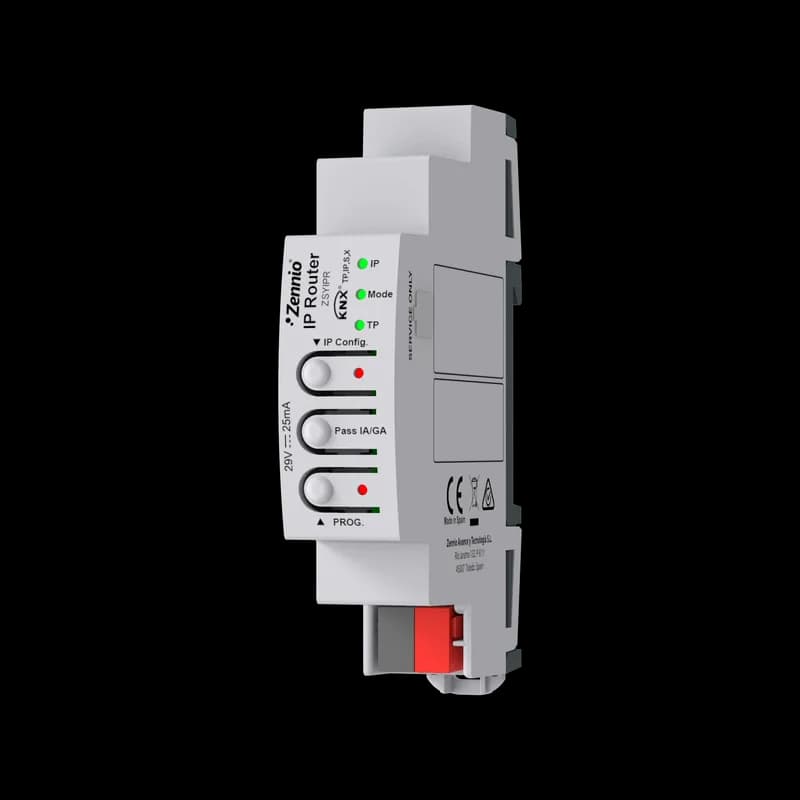
KNX twisted-pair lines are grouped into areas — up to 15 lines per area and up to 15 areas — and IP can serve as the backbone instead of twisted pair[15]. Zennio's IP Router links a TP line to the IP network: IP is the main line, TP the secondary one, and the router works as an area, line or segment coupler[3]. This puts the floors and buildings on one IP network, where the upper level connects. Routers, couplers and interfaces are in the System category of our catalogue.
- Tunnelling connections. IP Router holds up to 10 simultaneous KNXnet/IP tunnels for programming and monitoring over the IP network; each tunnel has its own individual address on the TP line[3]. ZennIoT also has up to 10 tunnels[16], the KIPI SC KNX-IP interface up to 5[17].
- Routing. With its factory settings IP Router routes telegrams by multicast to 224.0.23.12[3]. If the BMS gateway accepts KNXnet/IP routing, agree the address with the building's IT department.
- Gateway or upper-level server. This is a separate device or program that subscribes to group addresses on the KNX side and presents them as points over BACnet or Modbus on the BMS side. How many points a given gateway handles and how it updates them is defined by its manufacturer's documentation.
- Items in our catalogue. Zennio declares Modbus and BACnet integration[5]. Our catalogue has Z-Interface licences for exchange with a KNX-BACnet interface and with a KNX-Modbus TCP interface; they are project items, and their scope and applicability are confirmed for each project.
KNX Secure at the BMS interface. KNX IP Secure protects the exchange over IP, both the tunnels and the routing between IP routers; the Security Proxy function of IP Router turns secure multicast telegrams of one medium into plain telegrams of the other and back, and it is available only in ETS6[3]. Security is chosen per group address, and each secure tunnel has its own password[18]. If the BMS gateway does not support KNX Secure, decide in advance which group addresses stay open for it.
05
How many points does one room give?
The point count is built from a typical room. Below is an example list based on the objects of Zennio's manuals: an office module with a fan coil, two DALI groups, blinds and a ceiling multisensor, and a hotel room with a controller in the room panel. It is an example, not a norm: the actual list is set by the BMS specification.
Example of a BMS point list
| Room and source | Points | Count |
|---|---|---|
| Office: thermostat and fan coil, MAXinBOX FC 0-10V | Temperature, current setpoint, new setpoint, mode (command and status), heating or cooling, on/off (command and status), fan speed | 9 |
| Office: Presentia C MultiSensor | Occupancy, CO₂, humidity, light level | 4 |
| Office: window contact | Window open | 1 |
| Office: two DALI groups, DALI BOX Interface 64 v3 | On/off and dimming level of each group, lamp fault, ballast fault | 6 |
| Office: blinds | Position and up/down command | 2 |
| Office module, total | 22 | |
| Room: hospitality thermostat, MAXinBOX Hospitality v3 | Temperature, actual setpoint, guest setpoint, mode, climate on/off, fan speed | 6 |
| Room: statuses | Sold or not, occupancy | 2 |
| Room: window and entrance | Window open, room state (normal, make up, DND) from IWAC Display v3 | 2 |
| Hotel room, total | 10 |
The list is then multiplied by the number of rooms: a floor of 20 such office modules gives 440 points, a block of 150 such hotel rooms gives 1,500 points from the rooms alone, without common areas and metering. This total is compared with the gateway capacity from its manufacturer's documentation and with the number of tunnels it will take on the floor IP routers.
06
What does energy metering send to the BMS?
KES Plus gives per phase and in total the voltage, current, active power, power factor, consumed and generated energy in total and partial registers, a cost estimate for up to 6 tariffs and CO₂ emissions; it has up to 15 notifications, such as overvoltage, undervoltage and excess consumption[6]. For the BMS the sending settings matter most: periodic, on change or both, with a minimum time between sends and a minimum change of value. The Request metering object makes the meter send its current values at once, and the Heartbeat object periodically reports that the device is alive[6].
KCI 4 S0 turns the pulses of electricity, water or gas meters into KNX readings: energy, volume, power or flow[10]. It has alarms for excess and low power or flow and a data request object[10]. With DT51 ballasts, the DALI BOX Interface devices pass active energy and power per group and per ballast[2]. The meters and current transformers are in the energy efficiency category of our catalogue.
07
What should be agreed with the BMS engineer?
- The point list for each room type and the total for the building, based on the tables above.
- Read and write. Which points the BMS only reads and which it writes (setpoint, mode, sold or not sold).
- The format of each point. DPT and units: KES Plus sends energy in Wh or kWh and power in W or kW[6]; the CO₂ object of Presentia C MultiSensor has two options, floating point or unsigned integer[8].
- Sending frequency. Periodic, on change or on request, minimum interval and minimum change — as they are set in ETS for KES Plus[6].
- Gateway connection. Through which IP router or interface, and how many tunnels it takes: IP Router has up to 10[3].
- KNX Secure. Which group addresses are secured and who keeps the tunnel passwords[18].
- Time. Who keeps the clock on the bus: ZennIoT, for example, can be the installation's master clock with NTP synchronisation[16][19], and KES Plus synchronises its clock with the KNX system clock[20].
- The mapping table. Who keeps the "group address → BMS point" table and updates it with every change of the ETS project.
How to bring KNX floors into a BMS: step by step
- 1Split the functions
What stays in the room logic (lighting by presence, blinds, room climate) and what the BMS sees and changes.
- 2Draw up the point list
By room type, with the DPT, direction and sending frequency of every point.
- 3Design the topology
Lines by floor or zone, the IP backbone and the gateway connection point: up to 15 lines per area, up to 15 areas[15].
- 4Choose the gateway
Together with the BMS contractor: protocol (BACnet or Modbus), capacity from the gateway manufacturer's documentation, KNX Secure support.
- 5Secure the exchange
KNX IP Secure on the IP backbone, open and secured group addresses, tunnel passwords[3][18].
- 6Test one floor
Check every point in the BMS against the device state, and only then roll it out.
What you need
- Room sensors
Presence, light level, temperature, humidity and CO₂ in one ceiling sensor[8].
- Integration licences
Z-Interface for exchange with KNX-BACnet and KNX-Modbus TCP interfaces; project items, scope confirmed for each project.


08
What not to expect from KNX and Zennio at the BMS level
- Zennio does not replace the building's BMS. The Zennio Reflecta software provides monitoring, alarms, energy consumption management, schedules and lighting control[5]; the Zennio BMS licences in our catalogue are project items for the hotel part. The boiler room, ventilation and chillers are run by the building's BMS.
- No data on third-party gateways here. The point capacity and update method of other manufacturers' BACnet and Modbus gateways are in their own documentation.
- Zennio makes no leak, smoke or gas detectors. Third-party detectors with a dry contact are wired to the inputs of Zennio devices, and the alarm then becomes a KNX point.
- Zennio makes no weather station either. Wind and weather data for facade blinds come from a third-party KNX weather sensor.
We are the official Zennio distributor in Kazakhstan. For an office building or a hotel here, we help select the room devices, the IP backbone, the meters and the integration licences for the project — send us the BMS requirements.