01
What is a smart building, and where does KNX fit in?
A BMS (building management system), also called building supervision, is the top level. It collects the states and alarms of the building services, keeps trends and reports and gives the operator one interface. Below it are the systems that control the equipment directly. KNX is one of them: an open standard for home and building automation in which lighting, heating, blinds, security and energy management work together[7].
In practice the roles are split like this. KNX is responsible for rooms and zones: lighting, blinds, room climate, presence, local scenes and metering. The building's BMS is responsible for the overall picture and for the central plant. Zennio describes the same principle in its hotel catalogue: devices run their own logic and reach the central services, including the BMS, over the existing IP network without additional wiring[1].
For the building owner this means that KNX does not compete with the BMS. The BMS contractor receives ready data from KNX: states, temperatures, alarms and meter readings. Meanwhile the rooms keep working even when the top level is unavailable, because core KNX functions run locally[7].
How room data reach the BMS
Top level
- Building BMSBACnet and Modbus
- Reflectamonitoring and alarms
- Zennio Remoteremote access

Building automation levels and Zennio devices
| Level | Tasks | Covered by |
|---|---|---|
| Supervision (BMS) | Overall picture, alarms, trends, reports | The building's BMS; Reflecta software for monitoring, alarms, energy consumption and schedules; Modbus and BACnet integration |
| Backbone | Links between floors and buildings, remote access for engineers | KNX IP router, line couplers, KNX-IP interfaces |
| Room and zone | Lighting, blinds, climate, presence, scenes | DALI BOX and Lumento, Presentia and EyeZen, MAXinBOX, HeatingBOX, KLIC gateways, CX room controllers |
| Metering | Electricity, water, heat, cost by tariff | KES Plus, KEM, KCI 4 S0 |
Hotel floors in a building have their own logic: the room setpoint follows the occupied or vacant, sold or not sold and blocked for maintenance statuses[1]. That case is covered on the page about the smart hotel and guest room management.
02
Which functions does Zennio offer for commercial buildings?
On its commercial buildings page Zennio names offices, restaurants, retail, shopping centres, museums, educational buildings and clinics[8]. The main functions are these:
- Climate with seasonal limits
Setpoint limits on the thermostat keep comfort stable and consumption under control[8].
- DALI lighting and HCL
Light adapts to biological rhythms, and with DALI the groups and scenes change without rewiring[8].
- Access control
Entry to offices, meeting rooms and other zones by codes, cards or smartphones, with rights managed centrally[8].
- CO₂ monitoring
Air quality monitoring is part of Zennio's solutions for commercial buildings[8].
- Technical alarms
Alarms and preventive maintenance are among the functions for commercial properties[8]. Zennio does not make the detectors themselves: third-party leak, smoke or gas detectors with a potential-free contact are wired to the inputs of Zennio devices[3].
- Emergency lighting
For DALI emergency luminaires (DT1) the interface runs the function test and the duration test, also on a schedule[10].
- Energy metering
KES Plus measures electricity and its cost by tariff[4], KEM adds water and heat[11], and KCI 4 S0 brings in the readings of pulse meters[12].
- Remote supervision
System status, alarms and response to incidents without a site visit[8].
03
How should building lighting be controlled: DALI or KNX actuators?
Small rooms are well served by switching and dimming KNX actuators. On office floors, in retail areas and corridors DALI is more convenient: in Zennio's LCS lighting concept it means individual addressing of luminaires, flexible grouping and diagnostics without changing the existing wiring[13]. Zennio makes several KNX-DALI interfaces:
Zennio KNX-DALI interfaces
| Model | DALI lines | Ballasts | Emergency (DT1) | KNX Secure | Mounting |
|---|---|---|---|---|---|
| DALI BOX Interface 64 v3 | 1 | Up to 64 | Yes | No | 4.5 DIN units |
| DALI BOX Interface 64 X2 | 2 | Up to 64 per line | Yes | Yes | 4.5 DIN units |
| DALI BOX Broadcast 4CH v2 | 4 | Up to 64 per channel | Not stated | Yes | 4.5 DIN units |
| DALI BOX Broadcast 6CH v2 | 6 | Up to 64 per channel | Not stated | Yes | 4.5 DIN units |
| inBOX DALI 16 | 1 | Up to 16, up to 16 groups | Yes | Yes | In a mounting or junction box, Ø 51.7 mm |
The DALI BOX Interface devices are DALI-2 multi-master controllers. Besides luminaires they accept up to 16 DALI input devices per line (pushbuttons and sensors) and support DT8 colour ballasts, scenes, HCL, error detection and monitoring, and the Burn-in and Stand-by functions[9]. The Broadcast interfaces work plug & play, with no configuration on the DALI side[3], and detect a replaced ballast automatically[15].
Emergency lighting. The LCS concept covers control and monitoring of DALI luminaires by group or individually, emergency ones included[13]. For DT1 emergency ballasts the DALI BOX Interface devices run the battery function test and the duration test, both of which can be repeated automatically; there are also rest and inhibit commands that keep the lamp off when the mains fails, and an identification command that finds a luminaire by a visual or acoustic signal[10]. For hotel projects our catalogue has a ZBMS licence for emergency lighting testing and monitoring, ZLIZBMSEL.
LED strips. Constant-voltage LED strips are driven by Lumento PWM dimmers. For example, Lumento X4 v2 has 4 channels (independent, RGBW or tunable white), a relay for the LED power supply and KNX Data Secure support[18]. All of them are in the Lighting category of our catalogue.
04
How do presence detectors save energy?
Light and climate by presence is the simplest way not to spend energy in empty rooms. Zennio puts it directly for offices: lighting adapts to the use, occupancy and daylight of each zone[13].
Zennio presence and motion detectors
| Detector | Mounting | Detection area | Also |
|---|---|---|---|
| Presentia C v2 | Ceiling, surface or flush | Motion up to Ø 30 m, presence Ø 10 m (at 2.7 m height) | Light level 0–2000 lx, 2 constant light channels, thermostat |
| Presentia C MultiSensor | Ceiling, surface or flush | Motion up to Ø 30 m, presence Ø 10 m (at 2.7 m height) | Temperature, humidity, CO₂ 400–2000 ppm, CO₂ controller, KNX Data Secure |
| Presentia W v2 | Wall, mounting box | Up to 10 m | For corridors; 0, 1 or 2 touch buttons, proximity and light sensors |
| EyeZen TP v2 | False ceiling | Up to Ø 6 m | Light sensor, 2 constant light channels |
Constant light channels hold the set light level while taking daylight into account: the brighter it is outside, the less power the luminaires draw. The occupancy signal of the same detector is handy in the climate logic, to switch an empty zone to an economy mode. Presentia C is mounted only on a horizontal ceiling and no higher than 4 m, because the detection area shrinks above that[23].
05
How does KNX control room climate and connect to VRF?
Fan coils. For units with 0–10 V control there is MAXinBOX FC 0-10V: two 0–10 V outputs for the fan or the valves, 4 relay outputs, 4 inputs and 2 thermostats for 2- and 4-pipe systems[24]. The multifunction MAXinBOX 16 v4 can control up to 4 two-pipe fan coils in place of some of its lighting and blind outputs[25].
Radiators, underfloor heating, ducted systems. HeatingBOX 230V 8X v2 has 8 outputs for 230 V valves, 8 thermostats and 8 inputs in a 4 DIN unit housing[26]. Ducted systems are split into zones with ZoningBOX 6: 6 outputs for 12 or 24 V motorised grilles, up to 12 zones and up to 2 zone groups[27].
VRF and multi-zone air conditioning connect through KLIC gateways with two-way communication: KLIC-DI v2 for Daikin VRV and SKY[28] and KLIC-SG for Samsung VRF and the industrial range[29]. Zennio's catalogue also has KLIC-MDI for Midea VRF[3]. The compatibility of specific units is checked in Zennio's tool[30]. There is no KLIC gateway for Hisense in Zennio's 2026 catalogue[3]. For split units with an infrared remote, the catalogue has one-way control through the IRSC interface with the IRSC Plus application: it sends commands to the unit but does not receive its status[3][31]. A Hisense VRF system needs an approach agreed for the project.
06
How do you meter energy by floor and by tenant?
Zennio makes three types of metering devices[3]. KES Plus is a KNX electricity meter with external current transformers. KEM estimates power and energy of up to 3 circuits, water consumption on up to 4 channels and thermal energy of up to 2 modules[11]. KCI 4 S0 brings into KNX the readings of 4 meters with an S0 pulse output and splits consumption, cost and CO₂ emissions into 4 time periods[12].
- Network
- Three-phase with neutral, or three single-phase lines[4]
- Measurements
- Main electrical parameters; power (W or kW) and energy, 3 registers[4]
- Cost and CO₂
- Registers for cost and CO₂ emission estimates, cost counters for up to 6 tariffs[4]
- Current range
- 0.01–260 A, depending on the current transformer model[4]
- Accuracy
- 1% of active power at a power factor of 0.75–1 with Zennio transformers[4]
- Synchronisation
- With the KNX system clock[4]
- Housing
- 67 × 90 × 36 mm, 2 DIN units[4]
Meter readings are available in KNX: they are shown on panels, used in the logic and passed to the BMS. On its LCS page Zennio links lower consumption with the BREEAM, LEED and WELL certifications[13]. The meters and current transformers are in the Energy Efficiency category of our catalogue.
07
How do you build the IP backbone and secure KNX?
KNX on twisted pair is built of lines. Line couplers connect the lines through a main line: up to 15 lines form an area, and up to 15 areas are joined by area couplers. Instead of a twisted-pair backbone, IP can be used: a KNX IP router connects TP segments over the building network. A twisted-pair installation always needs a KNX power supply[2].
Zennio system devices for the backbone
| Device | Purpose | Key data | Size |
|---|---|---|---|
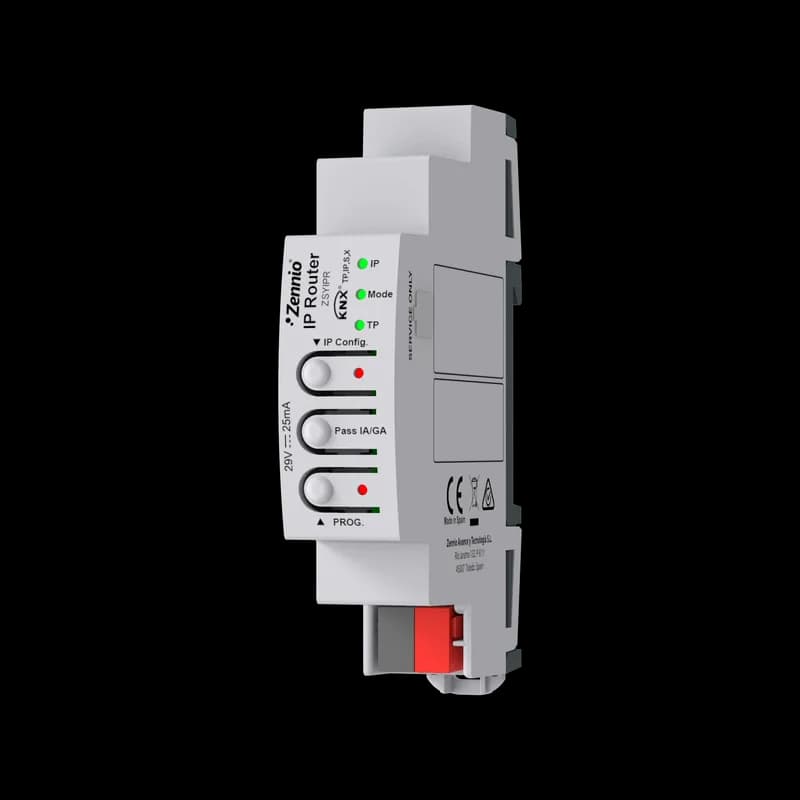
| IP Router | KNX-IP router: area, line or segment coupler | Up to 10 tunnelling connections, telegram filtering, KNX Data Secure and KNX IP Secure, Security Proxy, powered from the TP bus | Not stated in the manual |
| Linecoupler | Area, line or segment coupler | KNX Data Secure, Security Proxy, manual filtering control | 1 DIN unit |
| KIPI SC | KNX-IP interface | KNXnet/IP tunnelling, up to 5 connections, no auxiliary power needed | 2 DIN units |
| KUPSupply 640mA | Line power supply | 640 mA, auxiliary 29 V DC output | 4.5 DIN units |
Security. In a building with a shared IP network, encryption matters. KNX Data Secure protects the telegrams on the bus, and KNX IP Secure protects the exchange over IP[6]. Zennio publishes a KNX Secure guide[36], and support is stated in the technical documentation of the devices, for example Linecoupler, IP Router and ZennIoT[33][32][5].
08
How do KNX data reach the BMS over BACnet and Modbus?
Zennio declares integration with Modbus and BACnet and an API for other systems; according to its hotel catalogue, the devices reach the BMS over the existing IP network[1]. Which room points KNX passes to the BMS, with their datapoint types and the gateway questions, is in the guide What KNX sends to a BMS. For such projects our catalogue has Z-Interface licences for exchange with a KNX-BACnet interface and with a KNX-Modbus TCP interface, and the Zennio BMS licence per room. These are project items, and their configuration is confirmed for each building.
Before the specification is fixed, agree with the BMS contractor on three things:
- The list of points per room type: which states, setpoints, alarms and meter readings the BMS reads and which commands it may send.
- Who owns the logic: which functions run in KNX (room scenes, presence, setpoint limits) and which stay with the BMS (central plant, building-wide schedules).
- The network: where the KNX IP router and the BACnet or Modbus link sit in the building network, and whether KNX IP Secure is used.
09
Is remote access possible without a BMS?
For small buildings and single floors, remote supervision can be done without a BMS. RemoteBOX connects KNX to the Zennio Remote app[37]: 100 controls are included, and a licence raises them to 240[3]. ZennIoT does the same and also works as a KNX-IP interface for programming, with up to 10 tunnelling connections, KNX Data Secure and KNX IP Secure[5]. When the operator needs a ready interface for the KNX part, Reflecta provides it: Zennio describes it as a new way to manage the building, with an overview of its state and data for more efficient operation[8].
10
When is KNX not the best choice?
Zennio itself names the limits of KNX: laying the bus cable and the need for qualified specialists[38]. So KNX is planned at the design or refurbishment stage, not after the finishing works. The central plant of the building usually stays with the BMS, and KNX passes it the data of the rooms.
What Zennio does not make. There are no leak, smoke or gas detectors: third-party detectors go to the inputs of Zennio devices. There are no motors or tracks for blinds and curtains: third-party motors are connected to the shutter outputs of Zennio actuators. And there is no KLIC gateway for Hisense air conditioners; the options are in the climate section above.
Lighting and sensors
- DALI BOX Interface 64 X2ZDID64X2KNX-DALI Interface for up to 64 ballasts per channel - 2 channels

- DALI BOX Interface 64 v3: KNX-DALI Interface for up to 64 ballasts per channel - 1 channelZDID64V3

- DALI BOX Broadcast 4CH v2ZDIDLB4V2KNX-DALI Broadcast Interface to control up to 250 ballasts in 4 channels

- DALI BOX Broadcast 6CH v2ZDIDLB6V2KNX-DALI Broadcast Interface to control up to 250 ballasts in 6 channels

- inBOX DALI 16ZDIIBD16KNX-DALI Interface for flush mounting for up to 16 ballasts and 16 groups - 1 channel

- Lumento X4 v2ZDILX4V24-channel constant voltage PWM dimmer for DC LED loads.

- Presentia C v2ZPDC30LV2AKNX presence detector with luminosity sensor for ceiling mounting - Anthracite

- Presentia C MultiSensorZPDCMSAKNX presence detector with luminosity, temperature, humidity and CO₂ sensors for ceiling mounting - Anthracite

- Presentia W1 v2ZPDW1V2AKNX motion detector for wall mounting - 1 button - Anthracite

Climate and energy metering
- MAXinBOX FC 0-10VZCLFC010Fan coil controller for 2/4-pipe units with 0-10 VDC control of fan and/or valves

- MAXinBOX 16 v4ZIOMB16V4KNX multifunction actuator with KNX Secure - 16 outputs 16A

- HeatingBOX 230V 8X v2ZCL8H230V2Heating actuator for up to 8 outputs 230VAC and 8 inputs

- ZoningBOX 6ZCL-ZB6Zoning ducted air-conditioning actuator for up to 6 zones

- KLIC-DI v2ZCLDIV2Daikin-KNX gateway (SKY and VRV range)

- KLIC-SGZCLSGSamsung-KNX gateway (VRF and Industrial range)

- KES PlusZIO-KESPKNX Electrical energy meter

- KEMZEMKEMKNX Energy Monitor

- KCIZRX-KCI4S0KNX Interface for 4 consumption meters with S0-pulse outputs

System, remote access and project licences
- IP RouterZSYIPRKNX-IP Router
- LinecouplerZSYLCKNX Linecoupler

- KIPI SCZSYKIPISCZennio KNX-IP Interface. KNX Secure

- KUPSupply 640mAZPSU640KNX Universal power supply 640mA plus 29VDC auxiliary power supply

- RemoteBOXZSYRBOXDevice for remote control with Zennio Remote (100 controls, expandable to 240 with a licence)

- ZennIoTZSYIOTDevice for remote control with Zennio Remote that also works as a programming interface

- Reflecta - Software for hotel room and common areas control and visualization - License per roomZLIREF

- Z-InterfaceZLIZIBACLicense for KNX-BACnet interface communication.
- Z-InterfaceZLIZIMBUSLicense for KNX-Modbus TCP interface communication.