01
What is a GRMS, and how is it different from a PMS?
A PMS (property management system) is the front-office software: reservations, check-in, check-out and folios. A GRMS works one level down, inside the room. It controls the lights, climate, curtains and sockets and shows the staff what is going on in each room. The two systems do not replace each other; they exchange data. Zennio receives check-in and check-out information from the PMS and switches the room mode accordingly[1].
Zennio's solution is built on KNX, the open standard for home and building automation[3], published as the European standard EN 50090 and the international standard ISO/IEC 14543-3[4]. For an international hotel project this matters: certified KNX devices from more than 500 manufacturers work together, and all of them are configured in one engineering tool, ETS[3].
The system is decentralised. Each device has its own operating logic, so the room never depends on a single central controller[1]. The rooms reach the central services, including the building's BMS, over the hotel's existing IP network, without additional wiring[1].
How do PMS check-in and check-out data change the room mode?
Inside the room, the PMS data become a sold or not sold status. Together with the occupied or vacant status from the motion and door sensors, and with a block for maintenance, it decides what the lights, sockets and climate do[1]. Before the guest arrives, the room is air-conditioned and dehumidified[1].
Room modes by status (Zennio Solutions for Hotels catalogue)
| Room status | Lighting | Sockets | Climate |
|---|---|---|---|
| Sold and occupied | Welcome scene | Powered | Comfort mode; the setpoint limits are transparent to the guest |
| Sold and vacant | Off | Selected sockets unplugged | Standby with a setpoint chosen by the hotel; the guest's setpoint is remembered |
| Not sold | Staff scene | Off | Economy mode, with automatic dehumidification when required |
On the KNX side the sold status can also come from the lock system: the KILock and KIRN interfaces pass on whether the room is sold, the door state and who entered last, a guest or an employee[5][6]. The modes and delays applied at each transition are set in ETS, in the hospitality thermostat of the room controller[7].
Zennio's public documents do not describe the exchange protocol with each PMS: the hotel catalogue speaks of integration with more than 120 PMSs but does not list them[1]. So we pass the make and version of the hotel's PMS to Zennio and confirm compatibility before the specification is fixed.
02
What does a Zennio guest room do?
The functions below are described in Zennio's hotel catalogue and on its website; the set for a particular property is chosen at the design stage.
- Occupancy that cannot be fooled
Zennio calls its occupancy detection foolproof: there is no card holder where any card could be left to keep an empty room "occupied"[1].
- Do Not Disturb and Make Up Room
The guest sets DND or MUR at the entrance on a Tecla RGB 70 keypad, and the RingBOX doorbell has a DND mode[1]. Staff see the status outside, on the IWAC Display v3 access controller at the door[8].
- Climate under the hotel's control
The hotel limits the guest setpoint, and the guest does not notice the limits. The setpoint follows the room status, and the guest's temperature is remembered until they come back[1].
- Window open, HVAC off
When a window or door is open, the system switches the HVAC off and locks the thermostat[1].
- Master light control
At bedtime the guest turns off every light in the room with one command[1].
- Control from the hotel app or TV
The room can be controlled from the hotel's app or through IPTV[1].
- Lighting through the day
Scenes, schedules and human-centric lighting (HCL) change the light during the day[9].
- Technical alarms
Staff get real-time notifications of leaks or smoke[9]. Zennio does not make leak or smoke detectors: third-party detectors with a dry contact are wired to the inputs of Zennio devices.
03
Which Zennio devices make up a guest room?
Zennio's hotel catalogue shows a typical room like this: ALLinBOX in the electrical panel, Flat RGB XL keypads at the bedside for control of the whole room, Tecla RGB 70 with the RingBOX doorbell at the entrance, a CX40 room controller, EyeZen motion detectors on the ceilings of the room and bathroom, and a status panel outside the door[1]. In our catalogue the outside role goes to the IWAC Display v3 access controller, which shows DND/MUR at the entrance[8]. The Doorpanel of Zennio's hotel catalogue is not in our catalogue — tell us if your project needs it.
Guest room layout: from button to load
Loads
- Lighting
- Sockets
- Fan coil
- Curtains
Door and hotel
 IWAC Display v3access and status at the door
- Central software and PMSover the hotel IP network


ALLinBOX Hospitality v2 or MAXinBOX Hospitality v3?
Both controllers sit on the DIN rail in the room's electrical panel. Both drive a fan coil with a three-speed fan and have 6 analogue/digital inputs for a temperature probe, motion detectors and dry contacts[2][10]. The difference is what else is inside the housing.
Room controllers compared
| Parameter | ALLinBOX Hospitality v2 | MAXinBOX Hospitality v3 |
|---|---|---|
| KNX power supply | Built in, 160 mA + 29 V DC output | None; the device is powered from the KNX bus |
| KNX-IP interface | Yes: KNXnet/IP, up to 5 tunnelling connections | No |
| Fan coil type | 2-pipe | 2- or 4-pipe |
| Fan and valves | 3 speeds + 1 valve, 8(4) A | 3 speeds + 2 valves (open/close or one 3-point), 8(4) A |
| 16 A outputs | 1 individual output | 2: individual outputs, a second 3-point valve or a shutter channel |
| Analogue/digital inputs | 6 | 6 |
| Master Light controls | 2 | 1 |
| KNX Secure | KNX Data Secure and KNX IP Secure | KNX Data Secure |
| Power input | 110–240 V AC | From the KNX bus |
| Size | 4.5 DIN units | 4.5 DIN units |
ALLinBOX Hospitality v2 suits a room built around one device: it already holds everything needed for room control — bus power, the IP interface, relay outputs, fan coil control and sensor inputs[1]. MAXinBOX Hospitality v3 is the choice for 4-pipe fan coils or for a room with motorised curtains, because two of its outputs can work as a shutter channel[10]. The KNX power supply and the IP link are then added separately; they are in the System category of our catalogue.
- Power input
- 110–240 V AC, 50/60 Hz[2]
- KNX power supply
- 160 mA; auxiliary 29 V DC output, bus and output together no more than 250 mA[2]
- KNX-IP interface
- KNXnet/IP tunnelling, up to 5 connections; Ethernet 10/100, RJ45 socket[2]
- Fan coil outputs
- 3 fan speeds and a valve, 8(4) A at 250 V AC[2]
- Individual output
- 16(6) A at 250 V AC, capacitive loads up to 140 µF[2]
- Inputs
- 6 analogue/digital: temperature probe, motion detector, pushbutton or dry contact; cable up to 30 m[2]
- Logic
- 20 logic functions, clock with NTP synchronisation[2]
- KNX Secure
- KNX Data Secure and KNX IP Secure[2]
- Housing
- 67 × 90 × 79 mm (4.5 DIN units), IP20, operating temperature −5 to +45 °C[2]
Which controls go into the room?
CX room controllers are touchscreens that combine a thermostat with control of lighting, blinds and scenes[8]. In the hotel catalogue the CX40 is described as a room controller that brings lighting, climate control, blinds, audio and scenes into one fully customisable interface[1].
Room controls
| Model | Format | Controls | Thermostats | Inputs | Role in the room |
|---|---|---|---|---|---|
| CX35 | 3.5″ screen, 320 × 240 | 54 on standard pages | 2 | 4 | Compact room controller |
| CX40 | 4″ screen, 480 × 480 | 54 on standard pages | 2 | 4 | Main room controller |
| CX50 | 5″ screen, vertical or horizontal mounting | 96 on standard pages | 2 | 4 | Room controller with a larger screen |
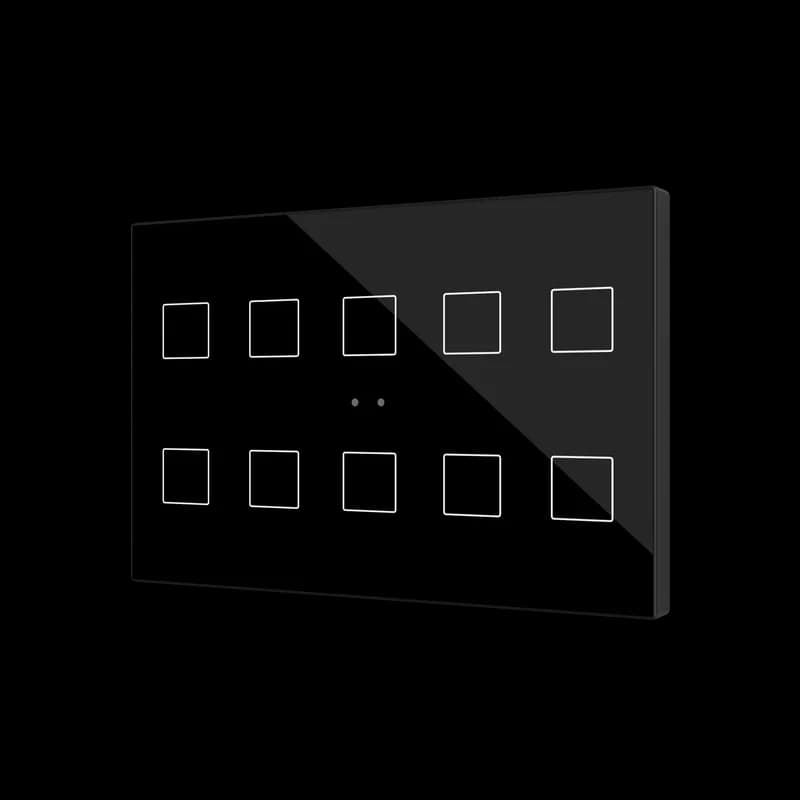
| Flat RGB XL | Glass, 4, 6, 8 or 10 touch areas with RGB backlight | Up to 10 buttons | 1 | 2 | Bedside: control of the whole room |
| Tecla RGB 70 | Polycarbonate (PC-ABS), 1, 2, 4 or 6 areas, 70 × 70 frames | Up to 6 buttons | 1 | 2 | Entrance: DND/MUR and lights |
| Flat RGB 70 | Glass, 1, 2, 4 or 6 areas, 70 × 70 frames | Up to 6 buttons | 1 | 2 | Additional control points |
Every CX controller has a proximity sensor: the screen wakes up when someone comes close, and the rest of the time it can show a clock, an image or stay dark[8]. CX35, CX40 and CX50 measure temperature and humidity, CX33 measures temperature; CO₂ is added with the ZACCO2S accessory[16][11][12][17]. The icons of Tecla and Flat keypads are customised in a web application[14], Zennio's Touch-MyDesign[18].
How does the room door work with IWAC Display v3, RingBOX and existing locks?
IWAC Display v3 is an access controller mounted in the wall next to the door, not on the door leaf. It grants access with MIFARE DESFire 2K and MIFARE Classic 1K NFC cards and over Bluetooth, shows the room number or name on a 128 × 64 OLED display, and has 3 touch areas and 2 inputs[19]. According to Zennio's catalogue, the display also shows the DND or MUR status chosen by the guest[8].
The door is released by the Securel v3 encrypted relay. IWAC sends it the opening command over an encrypted serial link inside the secure zone[19], and the relay drives one electric strike[20]. IWAC Display v3 needs an auxiliary 24 V DC supply, with a maximum consumption of 50 mA[19].
Keys are written by the Z-Access software: it keeps access reports for guests and staff, cancels cards and can work offline. With Zennio Key the guest receives a Bluetooth key on the phone before arriving at the hotel — the online check-in scenario[8].
A hotel that already has electronic locks does not have to replace them: according to Zennio, the system integrates with SALTO, Vingcard, Onity and dormakaba and tells whether a guest or an employee is entering the room[1]. On the KNX side, the KILock interface works with Vingcard and Onity locks, and KIRN with SALTO InRoomNode[5][21].
The RingBOX doorbell is a KNX insert with 4 doorbells, 8 tones and 65 dB of acoustic power at one metre. It protrudes 9.5 mm from the wall and needs no external power supply[22].
Which sensors detect the guest?
Presence is determined from several signals at once: motion detectors in the room and in the bathroom plus the door sensor[1]. For the false ceiling of a room, EyeZen TP v2 fits: a PIR motion detector with a detection range of up to Ø 6 m, a light sensor and an occupancy function, installed in a Ø 51 mm hole[23]. Zennio motion detectors connect directly to the inputs of ALLinBOX Hospitality v2 and MAXinBOX Hospitality v3, up to two detectors per input[2][10].
In corridors, the wall-mounted Presentia W v2 detects motion up to 10 m away[24]. Lobbies and restaurants get the ceiling-mounted Presentia C v2: at a mounting height of 2.7 m it detects motion in an area up to 30 m in diameter[25].
What if the room has a split or VRF air conditioner instead of a fan coil?
Split and VRF systems connect to KNX through KLIC gateways with two-way communication: KNX sends commands and also receives the unit's status[26]. For multi-zone systems there are KLIC-DI v2 for Daikin VRV and SKY[26] and KLIC-SG for Samsung VRF[27], both for DIN rail mounting. For residential indoor units there are compact 39 × 39 × 14 mm gateways that fit a mounting box: KLIC-DD v3 for Daikin and KLIC-MITT v3 for Mitsubishi Electric[28][29]. A specific model is checked in Zennio's online compatibility tool[30]. Zennio's 2026 catalogue has no KLIC gateway for Hisense[8].
Can the room have its own music?
Yes. AudioInRoom is a KNX audio controller with a built-in amplifier. The guest connects a phone over Bluetooth 4.2 (up to 2 paired devices); there is also an auxiliary line input and two amplified outputs, stereo or mono. The unit runs on 24 V DC and can be installed in a false ceiling[31].
Guest room equipment
- ALLinBOX Hospitality v2ZPRHPV2Multifunction device with KNX power supply, KNX-IP Interface, fan coil controller for 2-pipe unit and 6 a/d inputs

- MAXinBOX Hospitality v3ZCLHP126V3Fan coil controller for 2/4-pipe unit with 2 16A C-load outputs and 6 a/d inputs with KNX Secure

- CX40ZVICX40A4" KNX capacitive touchscreen for room control - Anthracite

- CX50ZVICX50A5" KNX capacitive touchscreen for room control - Anthracite

- Flat RGB XL 10ZVIFRXL10AGlass capacitive push button - 10 buttons - Anthracite
- Tecla RGB 70 X4ZVITR70X4APC-ABS Capacitive push button 70x70 - 4 buttons - Anthracite (ZS70 frame not included)

- RingBOXZSIRBOXKNX Doorbell - 4 doorbells and 8 tones (Cover not included ZSxxCRBOXx)

- IWAC Display v3ZVIIWACDV3AIn-Wall Access Controller with display(1) - Anthracite
- IWAC - Securel v3 - Encrypted Relay with KNX Secure. To use in combitation with IWAC family.ZIOSECV3

- KILockZITKILKNX Interface to Lock

- KIRNZIRNKNX Interface to InRoomNode

- EyeZen TP v2ZPDEZTPV2AKNX motion detector with luminosity sensor for ceiling mounting - Anthracite

- AudioInRoomZMU-AUIRKNX controller for audio with Bluetooth and auxiliary input. 2 amplified channels, 4 loudspeaker outputs

- KLIC-DI v2ZCLDIV2Daikin-KNX gateway (SKY and VRV range)

04
How does the hotel manage all rooms from one place?
Zennio's central software for hotels is called Reflecta. According to Zennio's catalogue, it provides real-time monitoring, alarm and energy consumption management, event scheduling, and lighting control and programming[1]. In our catalogue Reflecta comes as a licence per room, ZLIREF.
- Room statuses. The state of every room, and actions on it, from one screen[9].
- Who is in the room. Entries and exits in real time, with guests and staff told apart[9].
- Alarms. Notifications of power failures, leaks and smoke[9].
- Energy. Consumption monitoring and alarm management in Reflecta[1].
BMS and other systems. Zennio declares BMS integration over Modbus and BACnet and an API for the other systems of the hotel: guest apps, IPTV and back-office applications[1]. Supervision of the whole building, with the BACnet and Modbus licences we offer for it, is covered on the page about building automation on KNX. The room points the BMS receives are listed in What KNX sends to a BMS.
05
Which hotels use Zennio?
The hotels below are the ones Zennio lists among its emblematic references in the hotel catalogue[1]. They are the manufacturer's projects in different countries, not ours.
Hotel references from Zennio's hotel catalogue
| Hotel | City, country |
|---|---|
| Six Senses Ibiza | Ibiza, Spain |
| Almanac Barcelona | Barcelona, Spain |
| De Blanke Top | Cadzand, Netherlands |
| Amerikalinjen | Oslo, Norway |
| Sir Paul Boutique Hotel | Limassol, Cyprus |
| Nobu Hotel Los Cabos | Cabo San Lucas, Mexico |
| Hyatt Cap Cana | Punta Cana, Dominican Republic |
| St. Regis Cap Cana | Punta Cana, Dominican Republic |
| Minos Beach Art | Crete, Greece |
The catalogue gives neither room counts nor equipment lists for these properties. How room control works at the Mövenpick Hotel Brussels Airport in Belgium is shown in an official Zennio video.
06
How does a GRMS project in Kazakhstan run?
We are the official Zennio distributor in Kazakhstan. Our office is in Almaty, and we supply equipment across the country, including Astana. We help hotel owners, consultants, EPC contractors and KNX integrators select the devices and prepare the specification; design, installation and programming are done by the integrator. A project usually runs in this order:
- Input data and brief. Hotel category and room count by type, HVAC type (2- or 4-pipe fan coils, VRF, split systems), door locks, the PMS and the requirements of the BMS. The requirements can follow our GRMS specification checklist.
- Typical room. The room controller, keypads and sensors are chosen; a bill of materials is drawn up per room and per floor.
- Central level. Reflecta, PMS and BMS integration and the server side; the set of licences is confirmed for the project.
- Mock-up room. One room is installed and configured so the hotel can test the scenes before they are rolled out.
- Programming and commissioning. All KNX devices are configured in ETS, one tool for every manufacturer[3]. How the room logic is set in ETS is covered in the guide How to build a KNX hotel room.
07
What needs to be planned in advance?
- Wiring. KNX is a wired bus. Zennio itself names cabling and the need for qualified specialists as the limits of the technology[32], so a GRMS is planned at the design or refurbishment stage.
- Power at the door. IWAC Display v3 needs a separate 24 V DC supply[19].
- What Zennio does not make. There is no key card holder, so agree on sensor-based occupancy with the hotel's operations team before the design. There are no leak, smoke or gas detectors and no curtain motors or tracks: third-party detectors are wired to the inputs of Zennio devices, and third-party motors to the shutter outputs.
- Air conditioners. Each make and series needs its own KLIC gateway; check the model in the compatibility tool[30].
- Third-party locks. KNX interfaces exist for Vingcard and Onity (KILock) and for SALTO InRoomNode (KIRN)[5][21]; for other makes, dormakaba included, the connection is confirmed with Zennio for the project.